dodol File Explorer1.30
Publisher Description
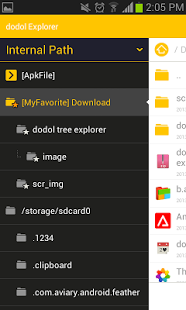
dodol File Explorer can manage any files in Android. Windows explorer like tree folder design gives you comfortable file browsing.
It has basic file managing functions like copy, paste, cut, send, and extract zip file. You can also access Internal memory, external SDcard and also root directory.
Moreover, you can easily access frequently used folders with favorite menus.
Key features
- Windows Explorer like tree folder browsing
- Multiple file selection
- Search APK files
- Customizable favorite folder
- Full file search
- Access root, external SD card, and internal memory
If you experience any difficulties to use this app, please use menu button to send feedback email to developer. We will always do our best to provide better application for you.
About dodol File Explorer
The company that develops dodol File Explorer is iConnect.Inc. The latest version released by its developer is 1.30. This app was rated by 1 users of our site and has an average rating of 4.0.
To install dodol File Explorer on your Android device, just click the green Continue To App button above to start the installation process. The app is listed on our website since 2015-04-09 and was downloaded 89 times. We have already checked if the download link is safe, however for your own protection we recommend that you scan the downloaded app with your antivirus. Your antivirus may detect the dodol File Explorer as malware as malware if the download link to com.campmobile.android.dodolfileexplorer is broken.
How to install dodol File Explorer on your Android device:
- Click on the Continue To App button on our website. This will redirect you to Google Play.
- Once the dodol File Explorer is shown in the Google Play listing of your Android device, you can start its download and installation. Tap on the Install button located below the search bar and to the right of the app icon.
- A pop-up window with the permissions required by dodol File Explorer will be shown. Click on Accept to continue the process.
- dodol File Explorer will be downloaded onto your device, displaying a progress. Once the download completes, the installation will start and you'll get a notification after the installation is finished.
Program Details
System requirements
Download information
Pricing
Version History
version 1.30
posted on 2015-04-09
[ version 1.23 ] Update - fixed a bug, improved inner structure,[ version 1.21 ] Update - improved thumbnails loading speed, added Settings,[ version 1.20 ] Update - fixed a bug that occurs when making thumbnails,[ version 1.19 ] Update - feature update : thumbnail(image, music, movie), fixed a bug that occurs when move file to another memory card.,Just released,feel free to contact us to make the app much better!
version 1.16
posted on 2013-07-04
Several fixes and updates
